Walter Senguer
Senior UI/UX Artist & Designer
WALTER SENGUER / SELECTED WORK
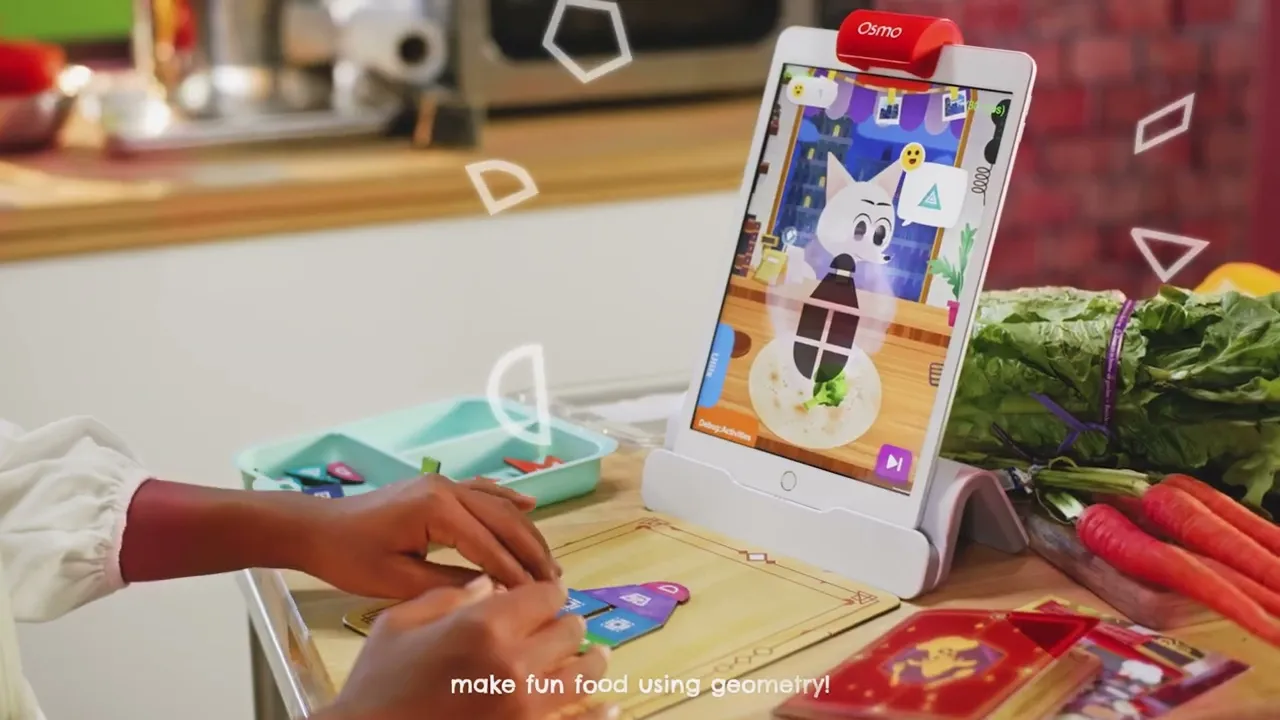
Math Wizard and the Fantastic Food Truck
Leading 0-to-1 hardware prototyping, curriculum UX, and visual direction for a hands-on geometry cooking adventure (ages 6–8)—achieving the highest eNPS across the entire company.
ROLE
Lead UI/UX Designer & Team Lead (First 8 Months)
STUDIO / PUBLISHER
Osmo
PLATFORM & ENGINE
iOS, Fire OS · Reflective AI (Computer Vision)
KEY IMPACT
Highest Company eNPS · Grades 1–2 Geometry Curriculum
Context & Contribution
THE CHALLENGE
Translating abstract Grades 1–2 geometry concepts (composite shapes, spatial decomposition, and fraction partitioning) into an intuitive, zero-friction tabletop cooking game where children assemble physical geometric tiles to fulfill customer orders.
MY CONTRIBUTION
Spearheaded the project from 0 to 1 during its first 8 months—co-designing the physical geometric manipulatives, defining the curriculum-aligned gameplay loop, and establishing the core UI/UX system before onboarding and handing off leadership to a newly hired designer.
PHASE 01
0-TO-1 ARCHITECTURE · USER FLOWS · TANGIBLE FTUE
Curriculum UX & Core Loop Architecture
Before moving into visual production, I mapped the end-to-end onboarding and core gameplay flow—aligning Grades 1–2 geometry standards with tactile tabletop interactions so children could learn how to compose ingredients without text-heavy tutorials.
Guided Physical-to-Digital FTUE: Structured the initial level flow around clear Demonstration, Focus, and Narration beats—teaching kids to place the mat, assemble geometric shapes, and trigger Reflective AI captures (Osmo Moments).
Customer Preferences & District Progression: Connected ingredient crafting with customer shape constraints, token rewards, and district polaroid progression to sustain curiosity across lessons

01 / INITIAL LEVEL & FTUE USER FLOW
Onboarding & Core Loop Architecture — Tangram Mat Setup, Shape Composition & District Progression
PHASE 02
R&D EXPLORATION · PHYSICAL-DIGITAL GESTURES · HUD WIREFRAMES
Tangible Interaction Exploration & HUD Wireframes
During early prototyping, we explored minimizing screen taps by mapping physical mat movements directly to game actions via Reflective AI—allowing us to test how young learners naturally interacted with the tabletop hardware before locking the final production UI.
HUD & Vision Architecture: Defined a clear vertical hierarchy separating customer shape requests (
Request), the cooking vessel (Magic Pot), and real-time camera feedback (Virtual Mat).Physical Gesture Prototyping (R&D): Prototyped directional mat-sliding gestures (right to drop into the pot, left to trash/undo, down for cooking treatments); while ultimately simplified in production to prevent accidental camera triggers during active play, this study directly informed the streamlined final control layout


02 / R&D GESTURE PROTOTYPING (EARLY EXPLORATION)
Physical Mat-Movement Study — Testing Directional Tabletop Gestures to Minimize Screen Friction

03 / HINT SYSTEM & SCAFFOLDING EVALUATION
Multi-Tier Hint Exploration — Evaluating Guidance Levels from Full Piece Breakdowns to Solid Silhouettes
PHASE 03
PRE-ALPHA UI · VISUAL DIRECTION · INTERACTION STATES
Pre-Alpha UI & Visual Direction
Moving from wireframes into Pre-Alpha art and UI prototypes, I established a tactile, storybook-inspired interface that kept young players focused on visual ingredients, clear selection feedback, and rewarding culinary milestones.
Zero-Text Recipe Building: Designed high-contrast ingredient selection modals with instant visual states (
NEWbadges, glow highlights, quick-remove toggles, and treatment icons).Kitchen Station & Reward Loops: Prototyped early cooking-station assignment interfaces (blender, stove, cutting board) and celebratory 3-star tally screens to reinforce geometric problem-solving.


04 / KITCHEN STATION & VALUE PROTOTYPES
Station Assignment Study — Mapping Numbered Ingredients to Blender, Cutting Board & Skillet Actions


05 / PRE-ALPHA VISUAL DIRECTION & INTERACTION STATES
Playful Kitchen UI & Recipe Flows — Customer Orders, Pot Feedback, Ingredient Selection & 3-Star Tally
PHASE 04
PRODUCTION UI · DESIGN DIRECTION · TEAM HANDOFF
Final Production UI & Design Leadership
As Lead UI/UX, I established the visual system, camera-driven scene transitions, and UI architecture before onboarding Thomas Heim (UI/UX Designer) to execute and polish the final production screens alongside our art and engineering teams.
Seamless Camera-Driven Transitions: Unified the food truck hub and cooking stations into a single continuous scene—using dynamic camera pans instead of hard screen cuts to keep young players immersed.
Tactile Drag-and-Drop & Franchise Consistency: Streamlined recipe building into intuitive drag-and-drop interactions while adapting Math Wizard series popup standards to fit the game’s whimsical culinary world.


06 / IMMERSIVE HUB & WORLD STATES
Main Food Truck Hub — Integrating Open/Closed States, Customer Arrivals & Polaroid Progression into the Environment


07 / STREAMLINED RECIPE COMPOSITION
Drag-and-Drop Ingredient Selection — Kid-Friendly Spatial Organization with Zero Text Friction


08 / SEAMLESS DISH PREPARATION
Continuous Scene Transitions — Connecting Customer Requests, Potion Treatments & Live Reflective AI Play


09 / WIREFRAME TO FINAL UI: ELIXIR STORE
Elixir & Upgrade Store. Full Progression from Low-Fidelity Layout Specs to Shipped Production UI


10 / FRANCHISE POPUP SYSTEM & SUMMARY
Unlock & Session Summary Popups — Adapting the Math Wizard Series Modal System with Custom Culinary Styling